If you want to change your account name and icon,
go to
LINE Official Account Manager
and "Edit Profile".
from flask import Flask, request, abort
import os

from linebot import (
    LineBotApi, WebhookHandler
)
from linebot.exceptions import (
    InvalidSignatureError
)
from linebot.models import (
    MessageEvent, TextMessage, TextSendMessage, ImageSendMessage,
)

app = Flask(__name__)

# Channel access token
CHANNEL_ACCESS_TOKEN=os.getenv('CHANNEL_ACCESS_TOKEN')
line_bot_api = LineBotApi(CHANNEL_ACCESS_TOKEN)
# Channel Secret
CHANNEL_SECRET = os.getenv('CHANNEL_SECRET')
handler = WebhookHandler(CHANNEL_SECRET)


@app.route("/callback", methods=['POST'])
def callback():
    # get X-Line-Signature header value
    signature = request.headers['X-Line-Signature']

    # get request body as text
    body = request.get_data(as_text=True)
    app.logger.info("Request body: " + body)

    # handle webhook body
    try:
        handler.handle(body, signature)
    except InvalidSignatureError:
        print("Invalid signature. Please check your channel access token/channel secret.")
        abort(400)

    return 'OK'

PREVIEW_URL = 'https://ipv6.ncnu.org/Images/ncnu_logo-100x100.png'
IMAGE_URL = 'https://ipv6.ncnu.org/Images/ncnu_logo-500x500.jpg'

@handler.add(MessageEvent, message=TextMessage)
def handle_message(event):
    msg = event.message.text
    image_message = ImageSendMessage(
        original_content_url = IMAGE_URL,
        preview_image_url=PREVIEW_URL)
    line_bot_api.reply_message(
        event.reply_token,
        image_message)
The reply_token is valid for replying only one message.
If you want to reply a text message and a picture, you may reply a list of messages:
line_bot_api.reply_message(
        event.reply_token,
        [TextSendMessage(text="NCNU"), image_message])
from flask import Flask, request, abort
import os

from linebot import (
    LineBotApi, WebhookHandler
)
from linebot.exceptions import (
    InvalidSignatureError
)
from linebot.models import (
    MessageEvent, TextMessage, TextSendMessage,
)

app = Flask(__name__)

# Channel access token
CHANNEL_ACCESS_TOKEN=os.getenv('CHANNEL_ACCESS_TOKEN')
line_bot_api = LineBotApi(CHANNEL_ACCESS_TOKEN)
# Channel Secret
CHANNEL_SECRET = os.getenv('CHANNEL_SECRET')
handler = WebhookHandler(CHANNEL_SECRET)


@app.route("/callback", methods=['POST'])
def callback():
    # get X-Line-Signature header value
    signature = request.headers['X-Line-Signature']

    # get request body as text
    body = request.get_data(as_text=True)
    app.logger.info("Request body: " + body)

    # handle webhook body
    try:
        handler.handle(body, signature)
    except InvalidSignatureError:
        print("Invalid signature. Please check your channel access token/channel secret.")
        abort(400)

    return 'OK'


@handler.add(MessageEvent, message=TextMessage)
def handle_message(event):
    msg = event.message.text
    msg = 'Version 1.4\nYou said: ' + msg.upper()
    user_id = event.source.user_id
    profile = line_bot_api.get_profile(user_id)
    display_name = profile.display_name
    msg += f'\nuser_id: {user_id}\ndisplay_name: {display_name}'
    msg += f'\nlanguage={profile.language}\npicture_url={profile.picture_url}'
    msg += f'\nstatus_message={profile.status_message}\nuser_id={profile.user_id}'
    line_bot_api.reply_message(
        event.reply_token,
        TextSendMessage(text=msg))
from flask import Flask, request, abort
import os

from linebot import (
    LineBotApi, WebhookHandler
)
from linebot.exceptions import (
    InvalidSignatureError
)
from linebot.models import (
    MessageEvent, TextMessage, TextSendMessage, ImageSendMessage,
)

app = Flask(__name__)

# Channel access token
CHANNEL_ACCESS_TOKEN=os.getenv('CHANNEL_ACCESS_TOKEN')
line_bot_api = LineBotApi(CHANNEL_ACCESS_TOKEN)
# Channel Secret
CHANNEL_SECRET = os.getenv('CHANNEL_SECRET')
handler = WebhookHandler(CHANNEL_SECRET)

@app.route("/callback", methods=['POST'])
def callback():
    # get X-Line-Signature header value
    signature = request.headers['X-Line-Signature']

    # get request body as text
    body = request.get_data(as_text=True)
    app.logger.info("Request body: " + body)

    # handle webhook body
    try:
        handler.handle(body, signature)
    except InvalidSignatureError:
        print("Invalid signature. Please check your channel access token/channel secret.")
        abort(400)

    return 'OK'


PREVIEW_URL = 'https://ipv6.ncnu.org/Images/ncnu_logo-100x100.png'
IMAGE_URL = 'https://ipv6.ncnu.org/Images/ncnu_logo-500x500.jpg'
USERS = []

@handler.add(MessageEvent, message=TextMessage)
def handle_message(event):
    msg = event.message.text
    if msg.lower().strip() == '/subscribe':
        USERS.append(event.source.user_id)
        line_bot_api.reply_message(
            event.reply_token,
            TextSendMessage(text='Successful Subscription'))

@app.route('/push')
def push():
    for user in USERS:
        notify(user)
    return f'Messages pushed to {len(USERS)} users.'

def notify(user_id):
image_message = ImageSendMessage(
        original_content_url = IMAGE_URL,
        preview_image_url=PREVIEW_URL)
    text_message = TextSendMessage(
        text='Do you want to order lunch? 學餐三樓特價中!')
    line_bot_api.push_message(
        to=user_id,
        messages=[text_message, image_message])
def broadcast_text():
    # 1. Configuration
    # Replace 'YOUR_CHANNEL_ACCESS_TOKEN' with your actual token
    ACCESS_TOKEN = os.getenv('CHANNEL_ACCESS_TOKEN')
    URL = 'https://api.line.me/v2/bot/message/broadcast'

    headers = {
        'Content-Type': 'application/json',
        'Authorization': f'Bearer {ACCESS_TOKEN}'
    }
    # 2. Message Payload
    # You can send up to 5 messages in a single broadcast
    data = {
        "messages": [
            {
                "type": "text",
                "text": "Hello! This is a broadcast message from NCNU_CSIE_Solomon 🚀"
            }
        ]
    }
    # 3. Execution
    response = requests.post(URL, headers=headers, data=json.dumps(data))
    # 4. Result Handling
    if response.status_code == 200:
        print("Broadcast sent successfully!")
    else:
        print(f"Error: {response.status_code}")
        print(response.text)
def broadcast_flex():
# 1. Configuration
# Replace 'YOUR_CHANNEL_ACCESS_TOKEN' with your actual token
ACCESS_TOKEN = os.getenv('CHANNEL_ACCESS_TOKEN')
URL = 'https://api.line.me/v2/bot/message/broadcast'
headers = {
'Content-Type': 'application/json',
'Authorization': f'Bearer {ACCESS_TOKEN}'
}
# 2. Message Payload
flex_json_string = r'''{
"type": "bubble",
"footer": {
"type": "box",
"layout": "vertical",
"contents": [
{
"type": "button",
"style": "primary",
"action": {
"type": "uri",
"label": "CNN",
"uri": "https://cnn.com/"
}
},
{
"type": "button",
"style": "secondary",
"action": {
"type": "message",
"label": "OK",
"text": "ok"
}
}
]
}
}'''
data = json.loads(flex_json_string)
# 3. Execution
response = requests.post(URL, headers=headers, data=json.dumps(data))
# 4. Result Handling
if response.status_code == 200:
print("Broadcast sent successfully!")
else:
print(f"Error: {response.status_code}")
print(response.text)
from flask import Flask, request, abort
import os
from linebot import (
LineBotApi, WebhookHandler
)
from linebot.exceptions import (
InvalidSignatureError
)
from linebot.models import (
MessageEvent, TextMessage, ImageMessage,
TextSendMessage, ImageSendMessage,
)
app = Flask(__name__)
# Channel access token
CHANNEL_ACCESS_TOKEN=os.getenv('CHANNEL_ACCESS_TOKEN')
line_bot_api = LineBotApi(CHANNEL_ACCESS_TOKEN)
# Channel Secret
CHANNEL_SECRET = os.getenv('CHANNEL_SECRET')
handler = WebhookHandler(CHANNEL_SECRET)
@app.route("/callback", methods=['POST'])
def callback():
# get X-Line-Signature header value
signature = request.headers['X-Line-Signature']
# get request body as text
body = request.get_data(as_text=True)
app.logger.info("Request body: " + body)
# handle webhook body
try:
handler.handle(body, signature)
except InvalidSignatureError:
print("Invalid signature. Please check your channel access token/channel secret.")
abort(400)
return 'OK'
@handler.add(MessageEvent, message=TextMessage)
def handle_message(event):
msg = event.message.text
line_bot_api.reply_message(
event.reply_token,
TextSendMessage(text='Please upload a picture.'))
STATIC_DIR = 'static/user_uploads'
os.makedirs(STATIC_DIR, exist_ok=True)
@handler.add(MessageEvent, message=ImageMessage)
def handle_image_message(event):
message_id = event.message.id
# print(f'User uploads a file with id={message_id}')
message_content = line_bot_api.get_message_content(message_id)
file_path = os.path.join(STATIC_DIR, f'{message_id}.jpg')
with open(file_path, 'wb') as f:
# Iterate over the content in chunks and write to the file
for chunk in message_content.iter_content():
f.write(chunk)
print(f"File successfully saved at: {file_path}")
from flask import Flask, request, abort
from PIL import Image
import io
import os
from linebot import (
LineBotApi, WebhookHandler
)
from linebot.exceptions import (
InvalidSignatureError
)
from linebot.models import (
MessageEvent, TextMessage, ImageMessage,
TextSendMessage, ImageSendMessage,
)
app = Flask(__name__)
# Channel access token
CHANNEL_ACCESS_TOKEN=os.getenv('CHANNEL_ACCESS_TOKEN')
line_bot_api = LineBotApi(CHANNEL_ACCESS_TOKEN)
# Channel Secret
CHANNEL_SECRET = os.getenv('CHANNEL_SECRET')
handler = WebhookHandler(CHANNEL_SECRET)
@app.route("/callback", methods=['POST'])
def callback():
# get X-Line-Signature header value
signature = request.headers['X-Line-Signature']
# get request body as text
body = request.get_data(as_text=True)
app.logger.info("Request body: " + body)
# handle webhook body
try:
handler.handle(body, signature)
except InvalidSignatureError:
print("Invalid signature. Please check your channel access token/channel secret.")
abort(400)
return 'OK'
@handler.add(MessageEvent, message=TextMessage)
def handle_message(event):
msg = event.message.text
line_bot_api.reply_message(
event.reply_token,
TextSendMessage(text='Please upload a picture.'))
@handler.add(MessageEvent, message=ImageMessage)
def handle_image_message(event):
message_id = event.message.id
message_content = line_bot_api.get_message_content(message_id)
image_bytes = io.BytesIO(message_content.content)
with Image.open(image_bytes) as img:
width, height = img.size # img.size returns a tuple (width, height)
format = img.format # e.g., 'JPEG' or 'PNG'
msg = f'Received file - Dimension: {width}x{height}, Format: {format}'
line_bot_api.reply_message(
event.reply_token,
TextSendMessage(text=msg)
)
- In addition to ImageMessage, the LINE platform also recognizes
AudioMessage (.m4a, .mp3) and VideoMessage (.mp4) types. Please make sure to use correct file extensions.
- When a user uploads a file that is not a recognized media type (image, video, audio, or a sticker), such as a .cpp, .txt, .pdf, or .zip file, the LINE Messaging API handles it using the generic FileMessage type.
- The event object contains specific properties that allow you to identify and retrieve the file:
- id (The value is a string like '594382346082582836'.)
- type (The value is always a string 'file'.)
- file_name (The original name of the uploaded file.)
- file_size (in bytes)
- For image messages, the type is 'image', and it does not have properties 'file_name' or 'file_size'.
from flask import Flask, request, abort
import os
from linebot import (
LineBotApi, WebhookHandler
)
from linebot.exceptions import (
InvalidSignatureError
)
from linebot.models import (
MessageEvent, TextMessage, FileMessage,
TextSendMessage,
)
app = Flask(__name__)
# Channel access token
CHANNEL_ACCESS_TOKEN=os.getenv('CHANNEL_ACCESS_TOKEN')
line_bot_api = LineBotApi(CHANNEL_ACCESS_TOKEN)
# Channel Secret
CHANNEL_SECRET = os.getenv('CHANNEL_SECRET')
handler = WebhookHandler(CHANNEL_SECRET)
@app.route("/callback", methods=['POST'])
def callback():
# get X-Line-Signature header value
signature = request.headers['X-Line-Signature']
# get request body as text
body = request.get_data(as_text=True)
app.logger.info("Request body: " + body)
# handle webhook body
try:
handler.handle(body, signature)
except InvalidSignatureError:
print("Invalid signature. Please check your channel access token/channel secret.")
abort(400)
return 'OK'
@handler.add(MessageEvent, message=TextMessage)
def handle_message(event):
msg = event.message.text
line_bot_api.reply_message(
event.reply_token,
TextSendMessage(text='Please upload a file.'))
STATIC_DIR = 'static/user_uploads'
os.makedirs(STATIC_DIR, exist_ok=True)
@handler.add(MessageEvent, message=FileMessage)
def handle_uploaded_file(event):
message_id = event.message.id
file_name = event.message.file_name # e.g., 'main.cpp'
file_size = event.message.file_size
message_content = line_bot_api.get_message_content(message_id)
file_path = os.path.join(STATIC_DIR, f'{file_name}')
with open(file_path, 'wb') as f:
# Iterate over the content in chunks and write to the file
for chunk in message_content.iter_content():
f.write(chunk)
print(f"File successfully saved at: {file_path} ({file_size} bytes)")
- Flex Messages are messages that offer an extensive and interactive layout compared to ordinary LINE messages. Ordinary LINE messages deliver only a single source type, such as text, image, and video.
- Flex Messages have a hierarchical structure for building blocks, in three levels. The top level is container, followed by blocks (header, hero, body, footer) and then components.
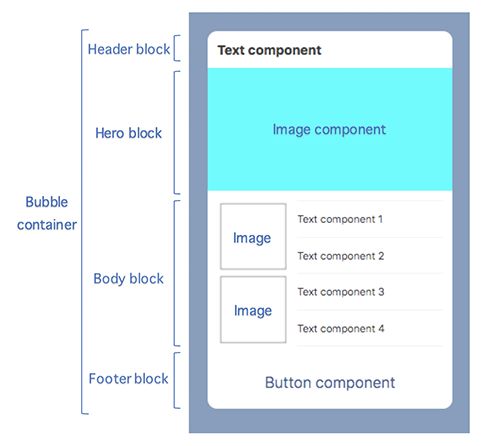
- Components in a Flex Message is defined in JSON.
The following is a simple example for "Hello World".
from flask import Flask, request, abort
import os
import json
from linebot import (
LineBotApi, WebhookHandler
)
from linebot.exceptions import (
InvalidSignatureError
)
from linebot.models import (
MessageEvent, TextMessage, ImageMessage,
TextSendMessage, ImageSendMessage, FlexSendMessage,
)
app = Flask(__name__)
# Channel access token
CHANNEL_ACCESS_TOKEN=os.getenv('CHANNEL_ACCESS_TOKEN')
line_bot_api = LineBotApi(CHANNEL_ACCESS_TOKEN)
# Channel Secret
CHANNEL_SECRET = os.getenv('CHANNEL_SECRET')
handler = WebhookHandler(CHANNEL_SECRET)
@app.route("/callback", methods=['POST'])
def callback():
# get X-Line-Signature header value
signature = request.headers['X-Line-Signature']
# get request body as text
body = request.get_data(as_text=True)
app.logger.info("Request body: " + body)
# handle webhook body
try:
handler.handle(body, signature)
except InvalidSignatureError:
print("Invalid signature. Please check your channel access token/channel secret.")
abort(400)
return 'OK'
@handler.add(MessageEvent, message=TextMessage)
def handle_message(event):
msg = event.message.text
flex_json_string = r'''{
"type": "bubble",
"body": {
"type": "box",
"layout": "horizontal",
"contents": [
{
"type": "text",
"text": "Hello,"
},
{
"type": "text",
"text": "World!"
}
]
}
}'''
flex_msg = FlexSendMessage(
alt_text='Flex Message',
contents=json.loads(flex_json_string))
line_bot_api.reply_message(
event.reply_token,
flex_msg)
from flask import Flask, request, abort
import os
import json
from linebot import (
LineBotApi, WebhookHandler
)
from linebot.exceptions import (
InvalidSignatureError
)
from linebot.models import (
MessageEvent, TextMessage, ImageMessage,
TextSendMessage, ImageSendMessage, FlexSendMessage,
)
app = Flask(__name__)
# Channel access token
CHANNEL_ACCESS_TOKEN=os.getenv('CHANNEL_ACCESS_TOKEN')
line_bot_api = LineBotApi(CHANNEL_ACCESS_TOKEN)
# Channel Secret
CHANNEL_SECRET = os.getenv('CHANNEL_SECRET')
handler = WebhookHandler(CHANNEL_SECRET)
@app.route("/callback", methods=['POST'])
def callback():
# get X-Line-Signature header value
signature = request.headers['X-Line-Signature']
# get request body as text
body = request.get_data(as_text=True)
app.logger.info("Request body: " + body)
# handle webhook body
try:
handler.handle(body, signature)
except InvalidSignatureError:
print("Invalid signature. Please check your channel access token/channel secret.")
abort(400)
return 'OK'
@handler.add(MessageEvent, message=TextMessage)
def handle_message(event):
msg = event.message.text
flex_json_string = r'''{
"type": "bubble",
"header": {
"type": "box",
"layout": "vertical",
"contents": [
{
"type": "text",
"text": "ORDER CONFIRMED"
}
],
"backgroundColor": "#27ae60"
},
"hero": {
"type": "image",
"url": "https://ipv6.ncnu.org/Images/ncnu_logo-100x100.png",
"size": "full",
"aspectRatio": "2:1"
},
"body": {
"type": "box",
"layout": "horizontal",
"contents": [
{
"type": "text",
"text": "Hello."
},
{
"type": "text",
"text": "Thanks for your purchase.",
"wrap": true
}
]
},
"footer": {
"type": "box",
"layout": "horizontal",
"contents": [
{
"type": "button",
"style": "primary",
"action": {
"type": "message",
"label": "YES",
"text": "Yes"
}
},
{
"type": "button",
"style": "secondary",
"action": {
"type": "message",
"label": "NO",
"text": "No"
}
},
{
"type": "button",
"style": "link",
"action": {
"type": "uri",
"label": "CNN",
"uri": "https://cnn.com/"
}
}
]
}
}'''
flex_msg = FlexSendMessage(
alt_text='Flex Message',
contents=json.loads(flex_json_string))
line_bot_api.reply_message(
event.reply_token,
flex_msg)
![[carousel]](carousel.png)
from flask import Flask, request, abort
import os
import json
from linebot import (
LineBotApi, WebhookHandler
)
from linebot.exceptions import (
InvalidSignatureError
)
from linebot.models import (
MessageEvent, TextMessage, TextSendMessage, ImageSendMessage,
FlexSendMessage,
)
app = Flask(__name__)
# Channel access token
CHANNEL_ACCESS_TOKEN=os.getenv('CHANNEL_ACCESS_TOKEN')
line_bot_api = LineBotApi(CHANNEL_ACCESS_TOKEN)
# Channel Secret
CHANNEL_SECRET = os.getenv('CHANNEL_SECRET')
handler = WebhookHandler(CHANNEL_SECRET)
@app.route("/callback", methods=['POST'])
def callback():
# get X-Line-Signature header value
signature = request.headers['X-Line-Signature']
# get request body as text
body = request.get_data(as_text=True)
app.logger.info("Request body: " + body)
# handle webhook body
try:
handler.handle(body, signature)
except InvalidSignatureError:
print("Invalid signature. Please check your channel access token/channel secret.")
abort(400)
return 'OK'
@handler.add(MessageEvent, message=TextMessage)
def handle_message(event):
msg = event.message.text
flex_json_string = r'''{
"type": "carousel",
"contents": [
{
"type": "bubble",
"body": {
"type": "box",
"layout": "horizontal",
"contents": [
{
"type": "text",
"text": "Alice",
"color": "#ff0000"
}
]
}
},
{
"type": "bubble",
"body": {
"type": "box",
"layout": "horizontal",
"contents": [
{
"type": "text",
"text": "Bob",
"color": "#00ff00"
}
]
}
},
{
"type": "bubble",
"body": {
"type": "box",
"layout": "horizontal",
"contents": [
{
"type": "text",
"text": "Carol",
"color": "#0000ff"
}
]
}
},
{
"type": "bubble",
"body": {
"type": "box",
"layout": "horizontal",
"contents": [
{
"type": "text",
"text": "Daniel",
"color": "#00ff00"
}
]
}
}
]
}
'''
flex_message = FlexSendMessage(
alt_text="Charlie's Angels",
contents=json.loads(flex_json_string))
line_bot_api.reply_message(
event.reply_token,
flex_message)
More actions can be found
here.
I think the most useful ones are
- Postback
- Message
- URI
from flask import Flask, request, abort
import os
import json
from linebot import (
LineBotApi, WebhookHandler
)
from linebot.exceptions import (
InvalidSignatureError
)
from linebot.models import (
MessageEvent, TextMessage, ImageMessage,
TextSendMessage, ImageSendMessage, FlexSendMessage,
)
app = Flask(__name__)
# Channel access token
CHANNEL_ACCESS_TOKEN=os.getenv('CHANNEL_ACCESS_TOKEN')
line_bot_api = LineBotApi(CHANNEL_ACCESS_TOKEN)
# Channel Secret
CHANNEL_SECRET = os.getenv('CHANNEL_SECRET')
handler = WebhookHandler(CHANNEL_SECRET)
@app.route("/callback", methods=['POST'])
def callback():
# get X-Line-Signature header value
signature = request.headers['X-Line-Signature']
# get request body as text
body = request.get_data(as_text=True)
app.logger.info("Request body: " + body)
# handle webhook body
try:
handler.handle(body, signature)
except InvalidSignatureError:
print("Invalid signature. Please check your channel access token/channel secret.")
abort(400)
return 'OK'
@handler.add(MessageEvent, message=TextMessage)
def handle_message(event):
msg = event.message.text
flex_json_string = r'''{
"type": "bubble",
"header": {
"type": "box",
"layout": "vertical",
"contents": [
{
"type": "text",
"text": "ORDER CONFIRMED"
}
],
"backgroundColor": "#27ae60"
},
"hero": {
"type": "image",
"url": "https://ipv6.ncnu.org/Images/ncnu_logo-100x100.png",
"size": "full",
"aspectRatio": "2:1"
},
"body": {
"type": "box",
"layout": "horizontal",
"contents": [
{
"type": "text",
"text": "Hello."
},
{
"type": "text",
"text": "Thanks for your purchase.",
"wrap": true
}
]
},
"footer": {
"type": "box",
"layout": "horizontal",
"contents": [
{
"type": "button",
"style": "primary",
"action": {
"type": "message",
"label": "YES",
"text": "Yes"
}
},
{
"type": "button",
"style": "secondary",
"action": {
"type": "message",
"label": "NO",
"text": "No"
}
},
{
"type": "button",
"style": "link",
"action": {
"type": "uri",
"label": "CNN",
"uri": "https://cnn.com/"
}
}
]
}
}'''
flex_msg = FlexSendMessage(
alt_text='Flex Message',
contents=json.loads(flex_json_string))
line_bot_api.reply_message(
event.reply_token,
flex_msg)
from flask import Flask, request, abort
import os
import json
from linebot import (
LineBotApi, WebhookHandler
)
from linebot.exceptions import (
InvalidSignatureError
)
from linebot.models import (
MessageEvent, PostbackEvent, TextMessage, ImageMessage,
TextSendMessage, ImageSendMessage, FlexSendMessage,
)
app = Flask(__name__)
# Channel access token
CHANNEL_ACCESS_TOKEN=os.getenv('CHANNEL_ACCESS_TOKEN')
line_bot_api = LineBotApi(CHANNEL_ACCESS_TOKEN)
# Channel Secret
CHANNEL_SECRET = os.getenv('CHANNEL_SECRET')
handler = WebhookHandler(CHANNEL_SECRET)
@app.route("/callback", methods=['POST'])
def callback():
# get X-Line-Signature header value
signature = request.headers['X-Line-Signature']
# get request body as text
body = request.get_data(as_text=True)
app.logger.info("Request body: " + body)
# handle webhook body
try:
handler.handle(body, signature)
except InvalidSignatureError:
print("Invalid signature. Please check your channel access token/channel secret.")
abort(400)
return 'OK'
@handler.add(PostbackEvent)
def handle_postback(event):
''' Postback allows you to send data to your Flask program
without starting a web browser. '''
postback_data = event.postback.data # ← Here: "sid=123&answer=yes"
# Parse the data (e.g., as query parameters)
import urllib.parse
params = urllib.parse.parse_qs(postback_data)
sid = params.get('sid', [''])[0]
answer = params.get('answer', [''])[0]
print(sid, answer)
#reply_text = f"Received postback: {postback_data}"
#print(reply_text)
#line_bot_api.reply_message(
# event.reply_token,
# TextSendMessage(text=reply_text)
#)
@handler.add(MessageEvent, message=TextMessage)
def handle_message(event):
msg = event.message.text
flex_json_string = r'''{
"type": "bubble",
"footer": {
"type": "box",
"layout": "vertical",
"contents": [
{
"type": "button",
"style": "primary",
"action": {
"type": "postback",
"label": "YES",
"data": "sid=123&answer=yes",
"displayText": "Yes"
}
},
{
"type": "button",
"style": "secondary",
"action": {
"type": "postback",
"label": "NO",
"data": "sid=123&answer=no",
"displayText": "No"
}
}
]
}
}'''
flex_msg = FlexSendMessage(
alt_text='Flex Message',
contents=json.loads(flex_json_string))
line_bot_api.reply_message(
event.reply_token,
flex_msg)
![[Login]](login.png)
![[Create Business ID]](create_business_id.png)
![[Create Official
Account]](create_official_account.png)
![[SMS Authentication]](sms_auth.png)
![[Official Account]](official_account.png)
![[Account Created]](official_account_created.png)
![[Gain Friends]](gain_friends.png)
![[Select Provider]](select_provider.png)
![[Privacy Policy]](privacy_policy.png)
![[Linked to Provider]](linked_to_provider.png)
![[Messaging API]](messaging_api.png)
![[Issue a Token]](issue_a_token.png)
![[Success]](success.png)